Quality Components That Keep Laptops Alive. 🚚 Quick Dispatch Across Nepal
Fast Courier Dispatch Across Nepal · 1–2 Days LOGIN / REGISTER
LyapCare Firmware Studio App Icon LyapCare Firmware Studio v2.5.1
Windows 10 / 11 x64 18.0 MB Portable ZIP Auto-Updating · Zero Manual ME Folders

Precision BIOS & CSME Repair Built for Modern Repair Benches

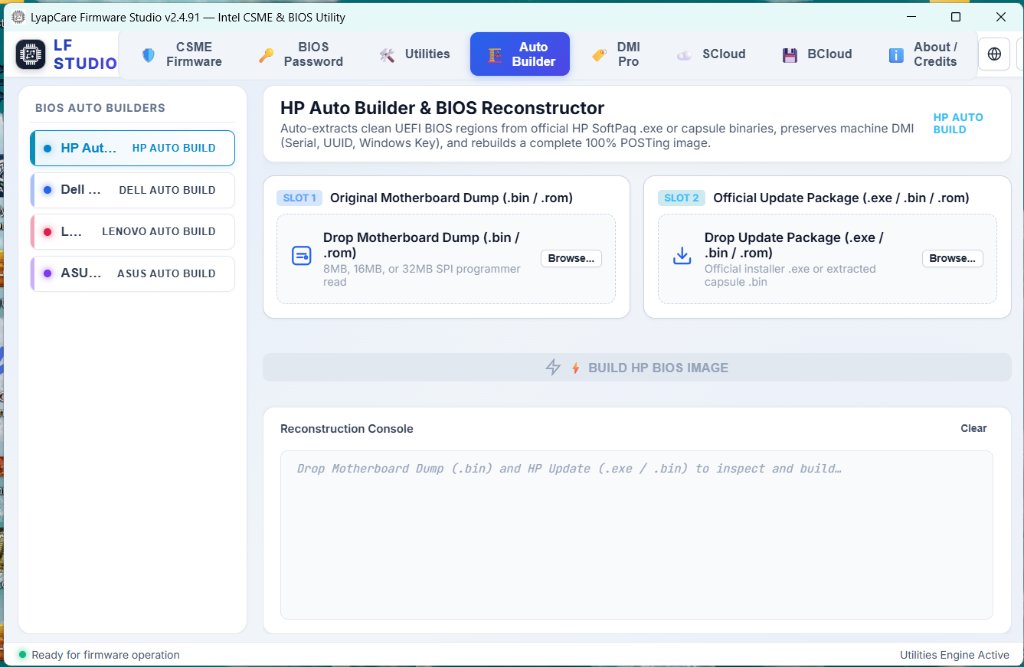
Clean dirty Intel CSME regions automatically via our verified Cloud CSME Repo, reconstruct factory BIOS builds from Dell / HP / Lenovo / ASUS packages while preserving board identity, remove enterprise BIOS locks, and inspect schematics inside one native Windows studio.

✓ Auto-fetches clean CSME on demand ✓ 1-Click Auto Update ✓ Instant NPR (eSewa / Khalti) & USD Keys
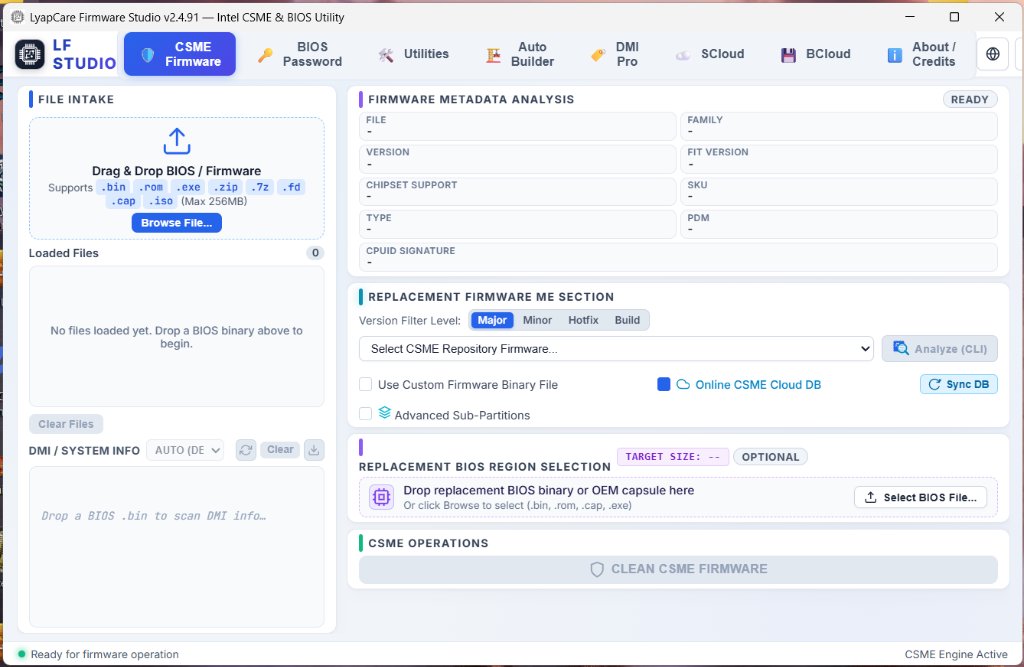
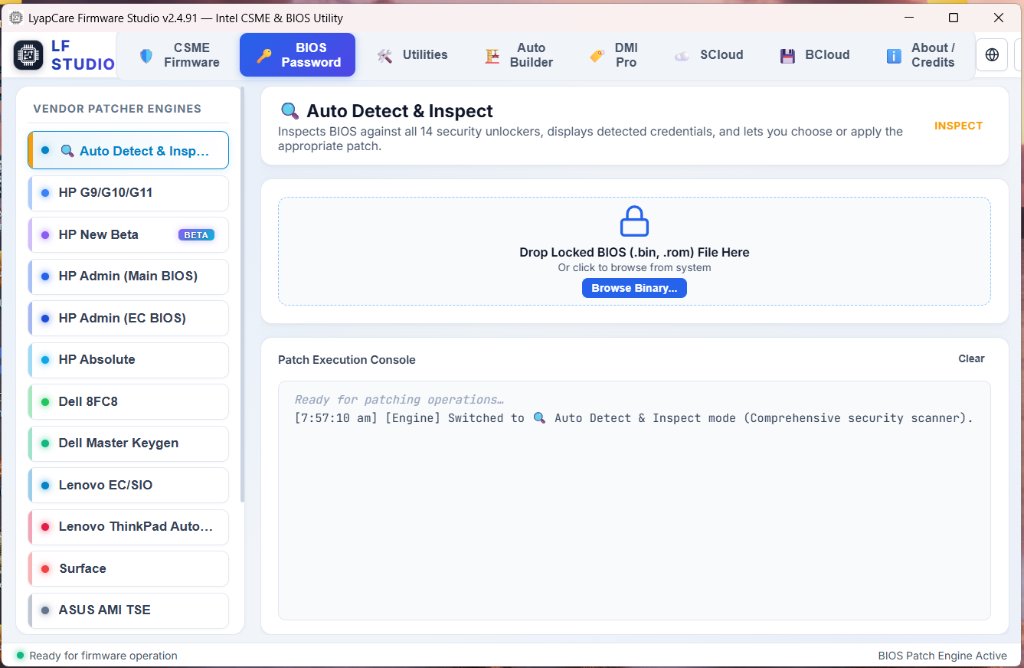
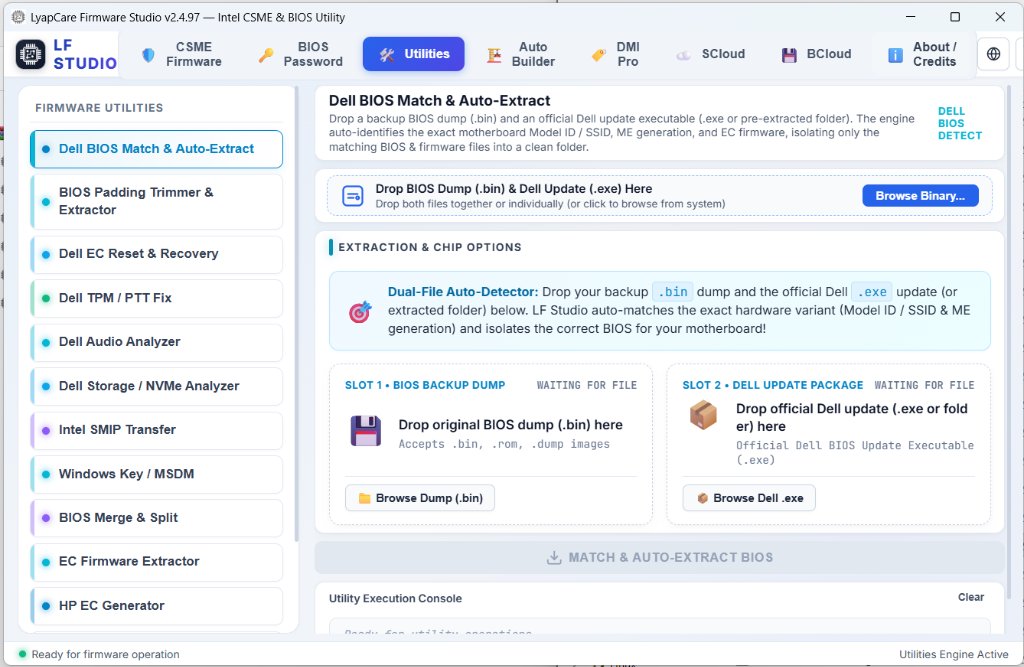
Inspect screens:
Just Shipped in v2.5.1 (2026-11-19) Zero-Scroll First-Run Layout, Site-Matched Logo & Redesigned Auto Builder Cards — Read Notes →
ME 1 – 21+ Intel CSME / TXE Coverage
4 Major Brands Dell · HP · Lenovo · ASUS Builder
15+ OEMs & DMI Pro Auto DMI Scan & NVRAM Repair
1,700+ Cloud Tested CSME Packages Ready
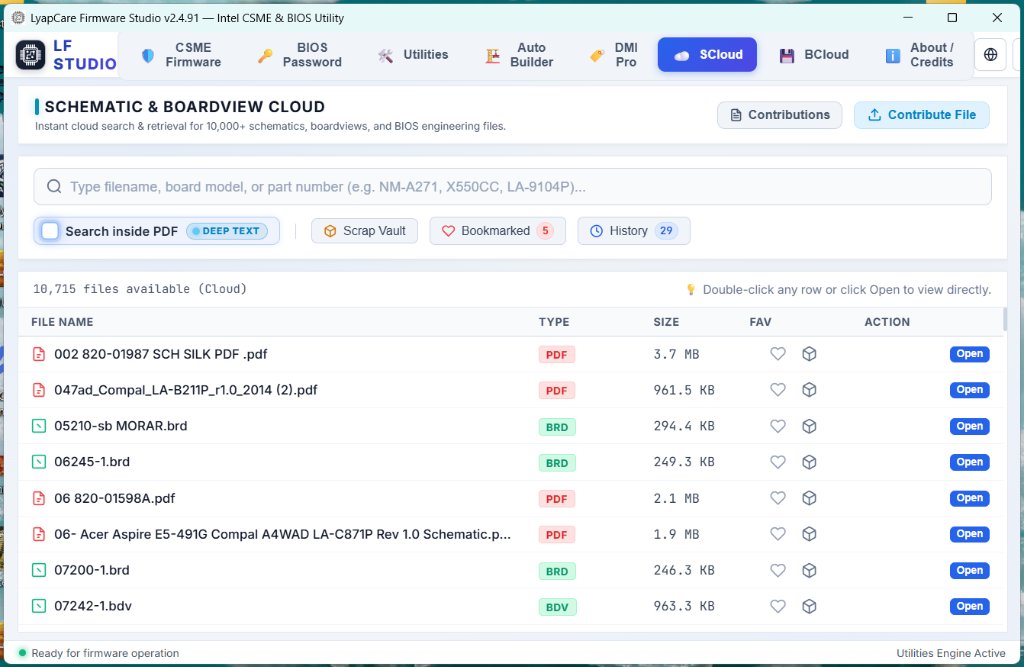
10,694 SCloud Schematics & BoardViews
Live Availability Lookup 7,911 PDF Schematics 2,783 BoardViews 21 Tested BIOS

Check Schematic, BoardView & Tested BIOS Availability

Verify whether your laptop motherboard schematic PDF, boardview layout, or bench-verified BIOS dump is ready inside LyapCare Firmware Studio before starting a repair or choosing a pass.

Get License Pass →
Try:
Enter at least 2 characters (board code, OEM part number, or laptop model) to check live availability.
PDF SCHEMATICS

7,911 Interactive PDF Diagrams

Full multi-page circuit schematics searchable by IC, net, or resistor inside LF Studio's hardware PDF viewer with automatic unlock support.

BOARDVIEWS

2,783 Native BoardView Layouts

Supports BRD, FZ, TVW, BDV, CAD, GR, PCB, F2B, BV, ASC, and BVR formats rendered smoothly with pad highlighting and net tracing.

TESTED BIOS

21 Verified BIOS Packages

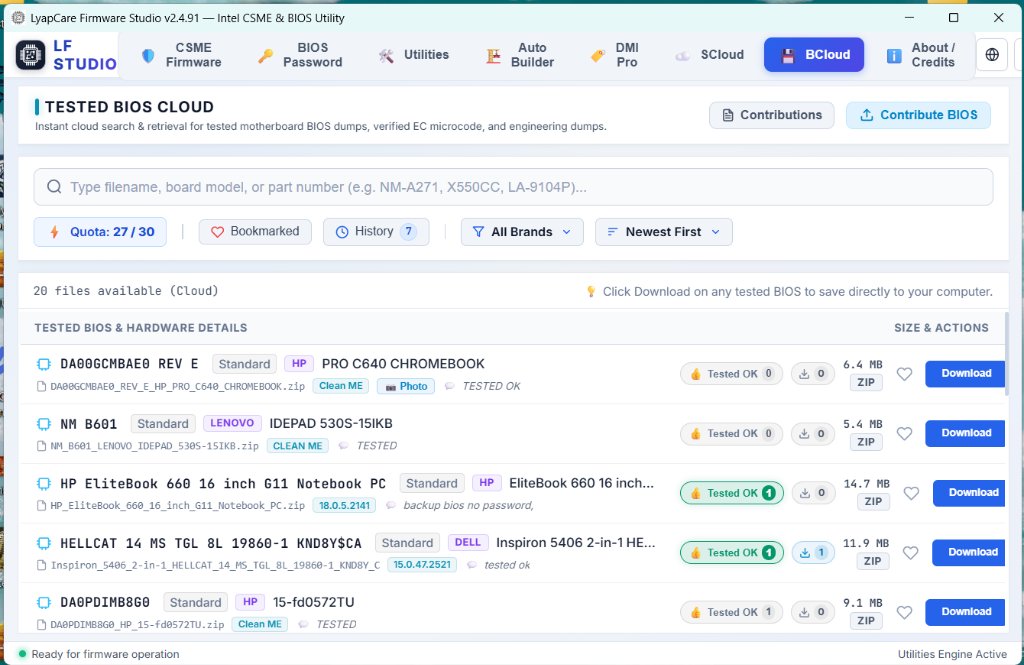
Bench-verified dumps tagged by brand, motherboard board code, Intel ME status, EC inclusion, and community Tested OK votes.

Complete Repair Architecture

Everything Your Bench Needs in One Window

Eight tightly integrated firmware, security, identity, and cloud diagnostic tools designed to cut motherboard repair turnaround times dramatically.

CORE ENGINE

Zero-Folder CSME Cleaning & Cloud Auto-Fetch

Stop wasting bench hours digging through bloated gigabyte archives. Drop your dump and LF Studio identifies the exact CSME generation and SKU, pulls only the verified clean binary from Online Cloud DB, validates integrity, and compiles cleanly.

  • ME Gen 1 through Gen 21+ & TXE
  • Automated Consumer vs Corporate SKU guard
  • Built-in compatibility pre-flight checks
OEM RECONSTRUCTION

4-Brand Auto BIOS Builder

Reconstruct fresh factory firmware directly from official Dell, HP, Lenovo, and ASUS update packages while transferring your customer’s original board identity untouched.

  • Dell · HP · Lenovo · ASUS support
  • Retains Service Tag, Feature Byte & Build ID
  • Preserves OEM Windows DPK automatically
UNLOCK SUITE

Enterprise BIOS Password Removal

Auto-detects lock schemes and clears BIOS supervisor passwords, computrace/persistence locks, and provisioning policies cleanly.

  • HP, Dell, Lenovo, Surface, ASUS, Acer & more
  • Includes Dell Master Keygen helper
IDENTITY & NVRAM

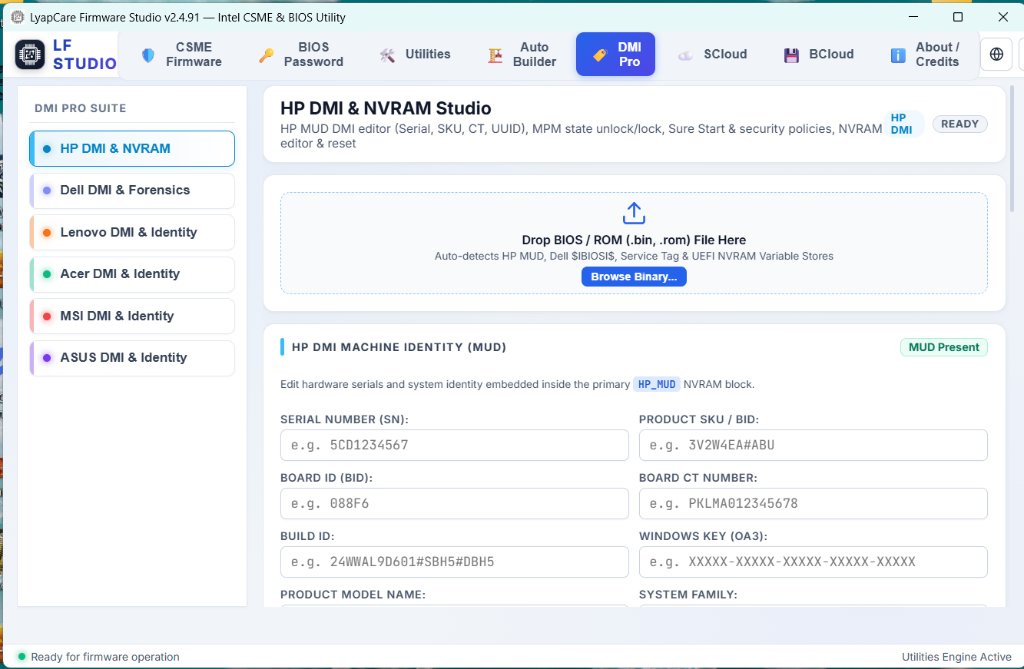
DMI Pro & NVRAM Editor

Inspect and repair DMI serials, UUIDs, Asset Tags, Windows product keys, and UEFI NVRAM variables across leading commercial boards.

  • 15+ OEM Auto DMI scanners
  • 6-brand deep DMI Pro & NVRAM suite
BENCH UTILITIES

10 Specialized Firmware & EC Tools

Standalone hardware utilities plus instant binary analyzer built directly inside LFStudio.exe—match OEM packages, reset EC/TPM states, and split/merge chips.

  • Dell OEM Match, EC Reset & TPM/PTT Fix
  • MSDM Windows Key transfer & BIN Split/Merge
CLOUD ECOSYSTEM

SCloud + BCloud Repository

Access 10,694 schematics & boardviews alongside verified Tested BIOS dumps with a fast built-in PDF and BoardView viewer.

  • 10,694 SCloud PDFs & BoardViews
  • Verified BCloud dumps with Tested OK votes
Why Technicians Upgrade

Stop Relying on Guesswork & Unverified Forum Dumps

Legacy BIOS Tools & Manual ME Folders
  • Downloading & manually organizing gigabytes of local CSME folders and paths
  • Chasing new ZIP downloads, extracting files, and fixing directories on every update
  • Hunting random third-party dumps hoping board revision matches
  • Broken or missing Windows keys, Feature Bytes, or serial errors after flash
  • Wrong CSME Consumer vs Corporate SKU causing 30s no-display or fan roar
  • Juggling 4 separate tools for PDFs, boardviews, extractors & unlockers
LF Studio Zero-Headache Cloud & Build Flow
  • Auto-fetches verified clean CSME from our tested Cloud Repo on demand — zero manual ME dirs
  • 1-Click Built-In Auto Update upgrades app & definitions automatically — zero manual ZIP hassle
  • Rebuilds directly from official Dell, HP, Lenovo & ASUS vendor updates
  • Keeps authentic customer Serial, Service Tag, Feature Byte & OEM Windows key
  • Built-in compatibility & SKU guard stops mismatched builds before programmer write
  • Integrated PDF Schematic Viewer, BoardViewer, Analyzer & Tested BIOS Cloud
Instant Automated Fulfillment

Flexible License Passes in NPR & USD

Pay locally via eSewa, Khalti, or Bank Transfer, or internationally by card. Keys activate instantly after checkout.

Quick Bench Pass

LyapCare Firmware Studio — 1 Day License Key

24-Hour Full Access
Rs 153.80 (approx. $1.00)
  • Full access to all LF Studio repair workspaces
  • Instant digital key delivery after checkout
  • Online CSME Cloud + SCloud + BCloud access
  • Ideal for urgent single-laptop or weekend repairs
Buy 1-Day Pass →
Workstation Transfer

LyapCare Firmware Studio - Hardware ID (HWID) Reset Pass

One-Time PC Unbind
Rs 769.00 (approx. $5.00)
  • Unbinds an existing active key from old PC hardware
  • Move your license safely after upgrading your bench PC
  • Works seamlessly after motherboard or SSD swaps
  • Re-activate instantly on the replacement computer
Order HWID Reset →
Continuous Updates

Recent Improvements (108 Total Releases)

Browse All Releases →
v2.5.1 2026-11-19

Zero-Scroll First-Run Layout, Site-Matched Logo & Redesigned Auto Builder Cards

Refined the LyapCare Firmware Studio desktop interface for an instant zero-scroll experience on launch, redesigned the BIOS Auto Builder vendor sidebar into clean two-line platform cards, and updated the header and About logos to match lyapcare.com.np across Dark, Light, and Black & White themes.

Auto BuilderCSME CleanerCore & Security
v2.5.0 2026-11-19

Offline SSD & Audio BIOS Forensics, PCIe AER Decoding, Codec ID & Surgical Log Reset

Upgraded Dell Storage / NVMe Analyzer and Dell Audio Analyzer with deep offline NVRAM health forensics, PCIe Root Port & AER error bit decoding, HDA codec verb table identification, UEFI DXE/PEI driver & ACPI NHLT stack verification, and one-click surgical stale-log invalidation.

UtilitiesCore & Security
v2.4.100 2026-11-18

Auto Builder ME Reset Compact Source Summary & Smart Priority

Streamlined Auto Builder's ME Reset (In-Place, No FIT) workflow by collapsing the full CSME source cards and Advanced CSME Settings into a compact 1-line Auto-Matched summary strip, while prioritizing exact-version Clean Repository ME binaries over newer OEM update capsules.

Auto BuilderCore & Security
v2.4.99 2026-11-18

1-Click ME Reset Mode (No FIT), Keep MFS & Dell Pro Gen 3 EC/NVRAM Hardening

Added a dedicated 1-click ME Reset (State Only) workflow across the CSME Firmware tab and Dell, HP, Lenovo, and ASUS Auto Builders with a Keep MFS toggle to preserve Dell CSME 16+ Service Tags, alongside Dell Pro Gen 3 Embedded Controller calibration and CSME 20+ NVRAM reset safeguards.

Auto BuilderCore & SecurityDMI ProUtilities
Documentation & Guides

Learn Every Workflow Step by Step

Read concise repair-bench manuals covering installation, ME cleaning, Auto Builder options, DMI Pro transfers, and troubleshooting.

Open Full Documentation Hub →
Frequently Asked Questions

Common Questions

What operating system is required to run LyapCare Firmware Studio?

LF Studio runs natively on Windows 10 and Windows 11 (64-bit). Download the latest ZIP archive, extract it cleanly to a dedicated folder such as C:\LFStudio, and run LFStudio.exe directly.

How is a license key delivered after purchase?

All digital passes (1-Day Pass, 1-Year Pro License, and Hardware ID Reset) are processed automatically by Lyapcare right after payment confirmation. You receive your activation key by email and inside your Lyapcare account orders page.

Does Auto Builder keep the customer Service Tag, Feature Byte, and Windows key?

Yes. Across supported Dell, HP, Lenovo, and ASUS packages, Auto Builder reconstructs fresh firmware from the official vendor update and automatically transfers customer machine identity, HP Feature Byte / Build ID, and the embedded OEM Windows Digital Product Key.

Can I switch LF Studio to a new workshop PC if I upgrade my computer?

Yes. Order the Hardware ID (HWID) Reset pass on the Lyapcare shop to unbind your existing active key from your old PC, then enter the same license key on your replacement computer.

Do I need to manually download or organize huge Intel CSME repository folders?

No. Online CSME Cloud DB is enabled by default inside LF Studio. Drop your dump and LF Studio identifies the exact version and SKU, automatically downloads only the verified clean CSME package needed, validates integrity, and builds your clean file cleanly.

How does LF Studio handle updates when new versions or toolkits ship?

LF Studio includes a built-in 1-click Auto Updater. When a new version or chipset definition is released, the app notifies you inside the window and updates cleanly in place—no manual ZIP re-downloading or folder management.

Are Schematic Cloud and Tested BIOS Cloud files verified before appearing in the app?

Yes. Community-submitted schematics, boardviews, and tested BIOS packages go through verification and automated archive checks before being listed inside SCloud and BCloud so files remain clean and ready for workshop diagnostics.

Official LyapCare Links & Policies
Review our public legal policies governing software licenses, refunds, and service support.
Secure & Fast Checkout

Official payment gateways accepting all major cards, mobile banking & digital wallets.

VISA
Mastercard
● fonepay UPI
NIC ASIA MoBank
eSewa
Khalti
CyberSource 3D-Secure
🔒 Bank-Grade 3D-Secure

Direct card processing through CyberSource & NIC ASIA Bank with SMS OTP verification.

⚡ Instant Digital Activation

LF Studio software passkeys are generated and delivered immediately on screen and via email.

🇳🇵 Nepal & UPI QR Payments

Scan via any Nepal Mobile Banking, Fonepay, eSewa, Khalti, or Indian UPI (Google Pay, PhonePe).

🛡️ PCI-DSS Compliant & 256-Bit SSL Encrypted: Your payment credentials are securely processed directly by authorized bank gateways and never stored on our servers.